MemberPass Enters the Agentic Era: REST API, MCP for AI Agents, Webhooks & Automations Go Live

Today marks the single biggest upgrade to MemberPass since we opened the doors. Not one release. Not two. Four. And together they change what your membership business can actually do.
MemberPass is no longer just a platform you log into. It is a platform you can talk to, automate, and plug into everything else you already use—from Slack and HubSpot to ChatGPT, Claude, Zapier, and the voice assistant in your car.
Say hello to the MemberPass REST API, the MemberPass MCP Server for AI Agents, MemberPass Webhooks & Events, and MemberPass Automations & Integrations. All ready for you to build on from day one.
Why This Matters: The Creator Economy Just Grew Up
For years, creators running paid Telegram communities have been stuck with the same three tools: a dashboard, a spreadsheet, and a lot of patience. Want to know how much you made last Tuesday? Open the dashboard. Need to ping a subscriber whose card just failed? Hop into your inbox. Building a welcome sequence for new members? Pray your favourite email tool supports the right trigger.
That model is officially over.
Everything you can click in the MemberPass dashboard is now available in four other ways too—through a documented REST API, through AI assistants like Claude and ChatGPT, through real-time webhook events, and through no-code platforms like Zapier and n8n. We call these the four keys to an autonomous creator business.
What does "autonomous" actually mean? It means you can be driving home, ask your phone "how did Premium Trading close the week?", and hear the answer read back to you. It means a brand-new subscriber can automatically land on a welcome email, a Slack ping, and a row in your CRM—without you ever touching a button. It means refunds, renewals, and role changes can flow into whatever system your team already lives in.
Let us walk you through each of the four keys, one at a time.
Key #1: The MemberPass REST API
What It Is (In Plain English)
The MemberPass REST API is a clean, documented way for any other piece of software to talk to MemberPass on your behalf. If you have ever heard of Stripe's API, Shopify's API, or the Twitter API back when it was still fun—this is ours.
Put simply: every button in your dashboard is now also a web address. A small amount of code (or a no-code tool like Zapier) can click those buttons for you.
What You Can Build With It
The API was designed with creators in mind, not just engineers. Here are a few of the things early users have already built:
Custom dashboards that mix MemberPass data with Google Analytics, Stripe fees, and ad spend—so you can see your true profit in one place.
Bulk access-code generators that mint 500 VIP codes for a partner launch, push them to Airtable, and DM the list to the partner—all in under a minute.
CRM pipelines that push every new subscriber into HubSpot or Pipedrive along with their plan name, monthly value, and trial status.
Mobile apps for your team that show real-time subscriber counts on a phone widget.
Internal admin tools tailored to how your business works—not how we think it should.
How Authentication Works (And Why It Is Safer Than Your Email Password)
To talk to the API you mint a personal access token from your dashboard at Settings → API Tokens. Every token starts with mpt_live_ so it is easy to spot in logs, and it is shown to you exactly once—copy it, paste it into wherever you need, and store it securely. We never see it again after that, and neither can anyone else.
Each token is locked to a single team when you create it. That team scope is permanent—a stolen token can never be pivoted into another team you own. You also pick exactly which abilities the token carries (there are 65 of them, things like project:view-any, plan:create, member:ban). If a token only needs to read subscription data, it should not be allowed to ban members. If it leaks? One click in the dashboard revokes it everywhere, forever.
Built-in Safety Rails
Idempotency keys. Every write request (creating a plan, cancelling a subscription) accepts an
Idempotency-Keyheader. Retry the same call within 24 hours and you get the same result back—no duplicate charges, no accidentally cancelling a subscription twice.Generous rate limits. 300 requests per minute and 10,000 per hour per token. More than enough for a dashboard that refreshes every few seconds across a whole team.
Versioning you can trust. The API lives at
/v1and will only ever get additive changes there—we will never break your integrations without a whole new major version and a long deprecation runway.GitHub secret scanning. Accidentally commit a token to a public repo? GitHub knows about our
mpt_format and will flag it automatically.
A Two-Line Taste
Making your first call is as simple as sending a GET request to https://api.memberpass.net/v1/teams/current with the header Authorization: Bearer mpt_live_… using your token.
You get back a clean JSON response with your team details. That is it. From there you can list projects, create plans, pull analytics, manage members—anything your token has permission to do.
Full reference and quickstart at docs.memberpass.net/api.
Key #2: The MemberPass MCP Server — Your AI Assistant, Now Running Your Business
This one is new enough that it needs a warm introduction, because it genuinely changes how creators work.
What Is MCP?
MCP stands for Model Context Protocol. Without the jargon: it is a secure handshake that lets AI assistants like Claude Desktop, ChatGPT Desktop, Cursor, and VS Code safely talk to real-world services. Think of it as giving your AI assistant a carefully locked-down key to your MemberPass account.
Once connected, your AI does not just read about MemberPass in training data that is two years old—it can actually do things in your live account: read, create, update, ban, refund, generate codes, pull analytics, audit changes. In plain English. In real time.
42 Tools, One Conversation
The MemberPass MCP server exposes 42 tools to your AI assistant, grouped roughly like this:
Projects & resources—list, create, update, archive, publish, link channels and groups.
Plans & subscriptions—build plans, manage pricing, cancel subscriptions, preview access-code costs.
Members—list, ban, unban, kick, audit, look up individual subscribers.
Access codes—bulk-generate codes, list them, revoke them, track redemptions.
Analytics & reporting—dashboard metrics, earnings breakdowns, plan performance, subscriber analytics, transaction histories.
Audit & infrastructure—activity logs, webhook endpoints, token management, bot status, deep links.
Connect In Under Two Minutes
All four major AI clients are supported out of the box:
Claude Desktop (Mac and Windows)
ChatGPT Desktop
Cursor (the AI-first code editor)
VS Code with the Claude extension
Each connection is a one-time paste of your token into the client's MCP settings. Step-by-step guides with screenshots for each client live at docs.memberpass.net/mcp.
What It Actually Feels Like
Here are some real prompts you can send your AI once connected. No code. No dashboards. Just plain conversation:
"List my MemberPass projects and tell me which has the most active subscribers."
"Which subscription plan in Premium Trading earned the most revenue last month?"
"Create a new project called Research Premium and scaffold a monthly plan at $29."
"Show me the five most recent failed payments across all my projects."
"Audit subscriber
usr_01HX…— has anyone banned and unbanned them in the last 30 days?""Break down last month's earnings by payment provider and format it as a table."
"Generate 100 VIP access codes for the Q2 Lagos meetup and give me the deep link."
Your AI thinks, calls the right MemberPass tools in sequence, and answers you—often with charts, tables, and follow-up suggestions.
Voice Control Your Entire Business
Here is where things get genuinely fun.

Because MCP just needs an AI client, and almost every modern AI client supports voice input, you can now operate your entire membership business by voice. On your phone while walking the dog. On your smart speaker while making coffee. Through your car's infotainment system while driving home.
A few real-world examples from our beta testers:
On a Sunday morning walk:"Hey Claude, what's my MRR right now and how does it compare to last week?" — spoken answer in 4 seconds.
Driving to a live event:"Generate 50 VIP access codes for tonight's meetup and text me the link."
Sitting on a flight with headphones on:"Summarise every refund issued this month and tell me which plans are seeing the most churn."
In the kitchen, hands wet:"A subscriber just DM'd complaining. Cancel their current subscription, refund the last payment, and note it in the activity log."
This is not science fiction. It is working today with Claude Desktop, ChatGPT Desktop, and any voice-to-AI pipeline you already use. Your revenue, members, and community all respond to your voice—as long as your token has the matching abilities.
Safety Rails for AI Agents
Letting an AI touch your business could sound scary. It isn't, because we built the whole thing assuming exactly that:
Minimum-privilege by default. When you mint an MCP token, zero abilities are pre-selected. You explicitly tick what you want the AI to be able to do—read-only for analytics assistants, write access only for tools you fully trust.
One token per AI, per job. A Claude Desktop token for daily use can be completely separate from a Cursor token your developer uses.
Every call is logged. Your activity log records every MCP tool invocation, the token that made it, and the result. You can see exactly what your AI agent did, down to the timestamp.
120 tool calls per minute per token. Enough for even the most ambitious agent workflow; not enough for anything to go runaway.
Instant revocation. Suspicious activity? Kill the token from the dashboard and every client using it stops working on the next call.
Key #3: Webhooks & Events — Your Business Speaks to You in Real Time
What Webhooks Are
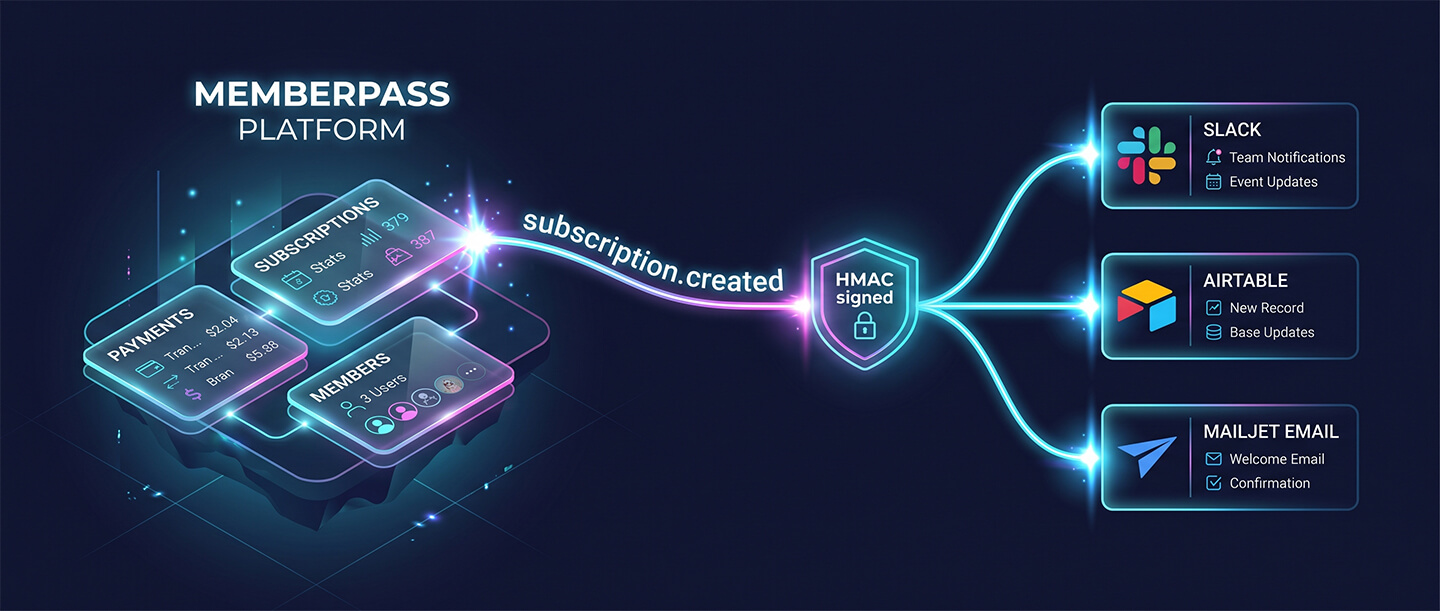
A webhook is, honestly, the simplest idea in this whole post: MemberPass calls a URL of yours the instant something important happens. A subscriber joined? We ping your URL. A payment failed? We ping your URL. A trial is about to convert? We ping your URL.
You can do anything you like when that ping arrives: send an email, post in Slack, update a spreadsheet, provision a Discord role, text your co-founder.
71 Events Across 10 Families
We ship 71 distinct event types at launch. Here is the lay of the land:
Subscription events (16)—created, activated, trial_started, trial_converting, trial_expired, renewed, reactivated, paused, unpaused, past_due, unpaid, cancelled, expired, refunded, upgraded, downgraded.
Member events (10)—joined, trial_joined, converted, churned, removed, banned, unbanned, kicked, resource_added, resource_removed.
Payment events (4)—succeeded, failed, pending, refunded.
Plan events (6)—created, updated, activated, deactivated, deleted, sync_completed.
Access code events (3)—generated, redeemed, expired.
Billing events (9)—your own MemberPass subscription events: invoice_created, invoice_paid, invoice_overdue, payment_failed, grace_period_warning, account_locked, tier_upgraded, tier_downgraded, tier_cancelled.
Project, team, role, and group events (23)—everything you need to track admin workflows and permissions.
What an Event Looks Like
Every event arrives as a clean, predictable JSON payload. For a subscription.created event, your endpoint receives:
A unique event id (for example
evt_01HX…) and the event type (subscription.created).A created_at timestamp in ISO 8601 format.
A subscription block with the subscription id, plan id, subscriber id, status, and end date.
A plan block with the plan name, price, and currency.
A subscriber block with the Telegram user id and any other identifiers on file.
Everything you need to send a welcome email, update a CRM, or post a Slack message is already inside the payload—no secondary API call required.
Delivery You Can Trust
This is the part that matters most. Webhooks are only as useful as they are reliable, and we engineered ours for paranoid reliability:
Cryptographically signed. Every delivery carries an
MP-Signatureheader containing an HMAC-SHA256 signature of the raw body plus a timestamp. Verify it before trusting the payload—it is impossible to spoof.Replay protection. The timestamp in the signature must be within 5 minutes of now. Captured traffic from three weeks ago cannot be replayed to fire old events.
8 retries over ~4 days. If your endpoint is temporarily down, we back off gracefully: 10 seconds, 30 seconds, 2 minutes, 10 minutes, 1 hour, 6 hours, 24 hours, 72 hours. You will not miss a single event because your server blinked.
Dead-letter queue. After all 8 retries, failed deliveries land in Settings → Webhooks → Deliveries where you can inspect them, fix your endpoint, and replay them manually.
Auto-disable. After 20 consecutive failures we pause the endpoint so we don't hammer a dead URL forever. One click in the dashboard brings it back.
Secret rotation with a 24-hour grace period. Rotating a signing secret dual-signs deliveries for 24 hours so you can roll secrets without dropping a single event.
What Creators Build With Them
Real-time MRR dashboards—listen to
payment.succeededandpayment.refundedand push every change into Metabase or Looker Studio.Churn Slack alerts—when
subscription.cancelledfires, drop a message in#churn-watchwith the subscriber's name, plan, and lifetime value so your retention team can reach out.Trial-to-paid nudges—
subscription.trial_convertingfires 24 hours before conversion; send a personal email that turns a one-time signup into a lifer.Telegram welcome DMs—fire a personalised greeting from your bot the instant
member.joinedlands, including a link to onboarding content.Stripe reconciliation—match
payment.*events with your Stripe receipts nightly to catch any discrepancies before your accountant does.Audit trails in Notion—every
team.member.role_changedappends a row to an internal Notion page so your leadership always knows who changed what.
Full event catalogue and signature-verification snippets at docs.memberpass.net/webhooks.
Key #4: Automations & Integrations — No-Code Power for Everyone
Not a developer? Good. This key was built for you.
The Platforms We Support
Zapier — our official app is live in the Zapier App Directory. 71 triggers, 24 actions, 35 searches—every webhook event is a trigger, and almost every dashboard action is available as a Zap step.
n8n — the self-hostable automation platform. Install
n8n-nodes-memberpassfrom npm and you get full REST parity plus all 71 triggers.Make (formerly Integromat) — use the standard HTTP and webhook modules with your MemberPass token. Great for visual scenario-builders in the EU.
LangChain — for Python and TypeScript agent developers, our OpenAPI spec drops straight into LangChain tool definitions.
Postman & Insomnia — import the OpenAPI spec to explore, test, and generate client code in any language you like.
Five Zaps You Can Build This Weekend
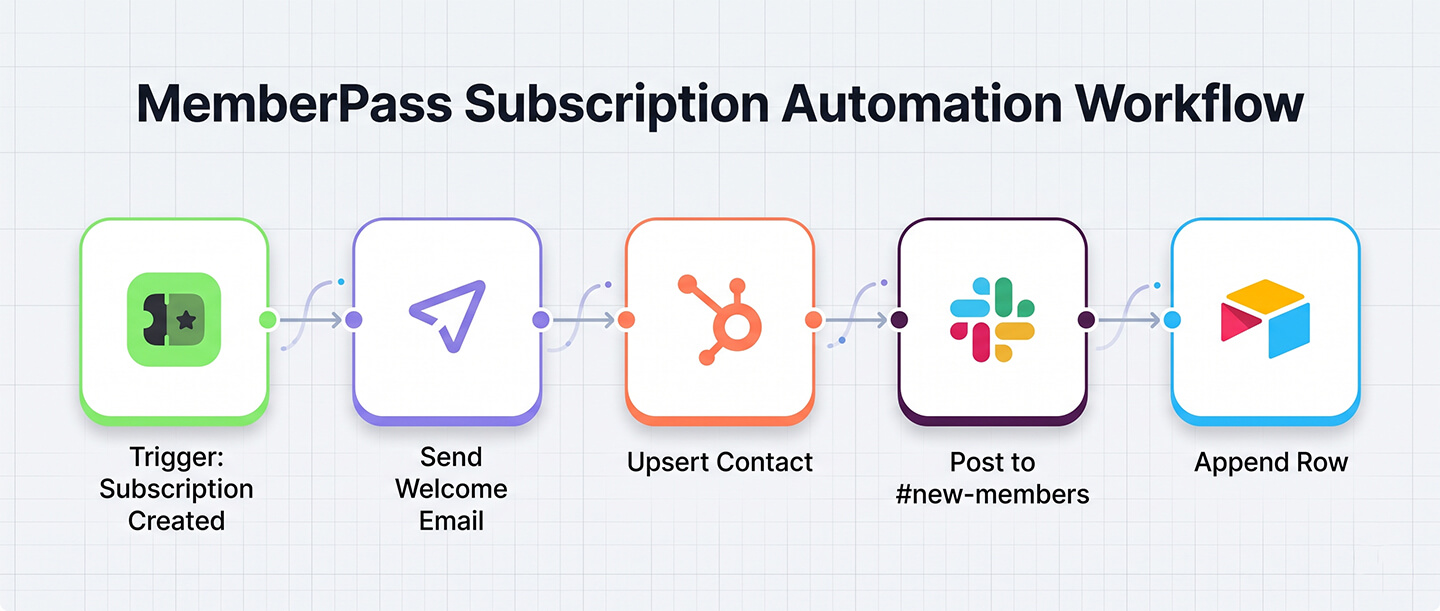
New Subscriber Welcome Flow—Trigger:
subscription.created. Actions: send a Mailjet welcome email, upsert a HubSpot contact with plan and MRR, post in#new-memberson Slack, append a row to Airtable for your records.Churn Saver—Trigger:
subscription.cancelled. Actions: Slack alert to your retention team, enrol the subscriber in a 3-email Mailjet win-back series, create a HubSpot task for a personal follow-up.Failed Payment Escalation—Trigger:
payment.failed. Actions: Slack ping, 12-hour delay, search subscription status again, and if still failed send a polite "please update your card" email.Gift Code Campaign—Trigger: new row in an Airtable "Influencer partnerships" base. Actions: bulk-generate 50 access codes, fetch a deep link, DM the influencer with both on Telegram or email.
Weekly Revenue Digest—Trigger: every Monday at 09:00. Actions: fetch dashboard metrics for the last 7 days, fetch earnings breakdown by provider, format as a Slack message, post in
#founders.
Pick the Right Platform for You
Zapier — non-technical creators, fastest to set up. 71 triggers. Bearer-token auth.
n8n — self-hosted, privacy-first, DevOps teams. 71 triggers. Bearer-token auth.
Make — visual scenarios, EU hosting. Triggers via webhooks. Bearer-token auth.
MCP — conversational AI workflows (Claude, ChatGPT, Cursor, VS Code). Bearer-token auth.
LangChain — custom Python / TypeScript agents. Triggers via webhooks. Bearer-token auth.
Recipe gallery and step-by-step guides at docs.memberpass.net/integrations.
Security That Doesn't Get in Your Way
Everything above rests on a security model we are genuinely proud of:
65 opt-in abilities per token—give each integration only what it absolutely needs.
Mandatory team scope—frozen at mint time, impossible to pivot.
GitHub secret scanning—accidental commits get flagged the moment they hit GitHub.
Instant revocation—one click and every client using that token stops working.
Full activity log—every API call, every webhook delivery, every MCP tool invocation is logged with its token and result.
Idempotency on every write—retries are always safe, duplicate charges are impossible.
HMAC-signed webhooks with 5-minute timestamp replay protection—inbound events cannot be forged or replayed.
One-click secret rotation—with a 24-hour dual-sign grace period so nothing breaks.
TLS 1.2+ enforced everywhere—no self-signed certificate bypasses, ever.
This is the same security posture banks and payment processors use. We just made it boringly easy to use.
Where to Go Next
Four deep-dive doc homes, one for each key:
REST API — authentication, quickstart, rate limits, idempotency, full reference: docs.memberpass.net/api
MCP Server — Claude/ChatGPT/Cursor/VS Code setup, tools reference, prompting guide, security: docs.memberpass.net/mcp
Webhooks — event reference, signature verification, retry behaviour, testing and debugging: docs.memberpass.net/webhooks
Integrations — Zapier recipes, n8n setup, Make scenarios, LangChain, custom agents, Postman: docs.memberpass.net/integrations
All of this ships on top of everything MemberPass creators already love: seven integrated payment gateways, Telegram Stars and Access Codes, ten supported languages, bank-grade security, and a platform that is proudly independent and bootstrapped—no VC influence, no data selling, no compromises.
The Future Runs on Your Terms
Your members still buy. Your content still ships. Your community still grows. What changes today is that all of it can run—quietly, automatically, on your terms—while you sleep, drive, or just think about the next big thing.
Mint your first API token, connect your favourite AI assistant, fire up a Zap, and meet the new MemberPass.
আপনি কি আপনার
টেলিগ্রাম বিজনেস স্বয়ংক্রিয় করতে প্রস্তুত?
ম্যানুয়ালি ব্যবহারকারী পরিচালনা করা বন্ধ করুন। আপনার সাম্রাজ্য গড়ে তুলতে শুরু করুন। MemberPass দিয়ে হাজারো নির্মাতার মতো সহজে আপনার চ্যানেল থেকে আয় করুন।